
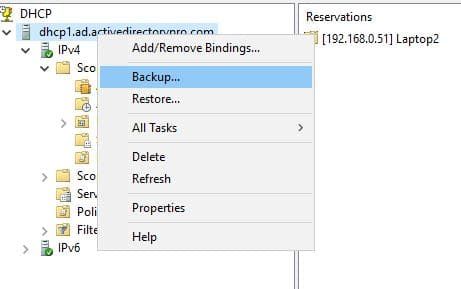
Windows servers running the DHCP role store the active copy of the DHCP database in %SystemRoot%\System32\DCHP directory. By default, the DHCP service backs up the database every 60 minutes to %SystemRoot%\System32\DCHP\backup. However, in the event of a DHCP server crash, DHCP database corruption, or a malware event, you might not be able to access this folder to perform a restore operation. You can add another layer of protection by setting up a scheduled task to back up the database to a network share, or you may simply opt to set up a task to copy the DHCP\backup folder to an alternate location at a scheduled time daily. The Powershell command to back up the database is as follows:
Backup-DhcpServer -path C:\DhcpBackupFolder
This command will create a sub-folder called NEW containing the database backup files and a file called DhcpCfg in the root of the target backup folder. You need both the config file and the files in the backup folder in order to restore.
If you should ever have to restore your DHCP server from your powershell-driven backup process, you will first need to copy the config file and "new" subdirectory contents to the "%SystemRoot\System32\DCHP\backup" folder before the DHCP restore operation will function properly.
If you would rather use Powershell instead of the GUI for the restore, the command is as follows:
Restore-DhcpServer -ComputerName "ServerNameHere" -path "C:\Windows\sytem32\dhcp\backup"
Backup-DhcpServer -path C:\DhcpBackupFolder
This command will create a sub-folder called NEW containing the database backup files and a file called DhcpCfg in the root of the target backup folder. You need both the config file and the files in the backup folder in order to restore.
If you should ever have to restore your DHCP server from your powershell-driven backup process, you will first need to copy the config file and "new" subdirectory contents to the "%SystemRoot\System32\DCHP\backup" folder before the DHCP restore operation will function properly.
If you would rather use Powershell instead of the GUI for the restore, the command is as follows:
Restore-DhcpServer -ComputerName "ServerNameHere" -path "C:\Windows\sytem32\dhcp\backup"
 RSS Feed